

You open a pull request with a three-line change. The review looks simple, the code works on your machine, and someone approves it. Minutes later, the application in production fails to load because the runtime version on the server was not the same as on your laptop.
The mistake didn’t start with the deployment. It started when the team accepted the promise of “it works on my machine” instead of reproducible evidence.
GitHub Actions turns repository events into automated checks and deliveries. Every pull request can prove that the code installs, tests, and builds in a clean environment. After approval, the same process can prepare an artifact and deploy it with controlled permissions.
In this guide, you will build this complete path for a minimal static site. The lab starts with continuous integration (CI) and evolves into continuous deployment (CD) on GitHub Pages. At the same time, it connects the practice to the concepts that appear in the GH-200: GitHub Actions exam.
Important
This article is independent study material. It does not contain actual exam questions, does not guarantee a passing score, and does not replace the official guide, which may be updated. Use the lab to develop practical reasoning, not to memorize YAML.
What you will be able to do#
By the end of the lab, you will know how to:
- differentiate between workflow, event, job, step, runner, and action;
- run tests automatically on pull requests and pushes to
main; - use a matrix to validate two Node.js versions;
- chain test, build, and deploy with
needs; - publish an artifact to GitHub Pages;
- limit
GITHUB_TOKENpermissions; - protect the production environment and prevent concurrent deployments;
- locate a failure in the logs and choose a safe rollback method.
The result will be this sequence:
Pull request → testes em Node 22 e 24 → build → revisão → merge em main ↓ artefato → GitHub PagesWhere this lab meets GH-200#
In the study guide version checked on August 2, 2026, the measured skills are distributed like this:
| Area | Exam weight | What you will practice here |
|---|---|---|
| Create and manage workflows | 20-25% | events, jobs, steps, matrix, contexts, dependencies, and outputs |
| Consume and troubleshoot workflows | 15-20% | execution history, logs, matrix names, and re-running |
| Create and maintain actions | 15-20% | difference between run and uses; safe action consumption |
| Manage GitHub Actions for the enterprise | 20-25% | runners, secrets and variables scope, policies, and reusable components |
| Secure and optimized automation | 10-15% | least privilege, full SHA, environments, OIDC, concurrency, and matrix cost |
A single lab does not cover the entire certification. JavaScript, Docker, and composite actions, reusable workflows, runner groups, enterprise policies, attestations, and administration APIs remain in your study plan. The advantage of this project is to create the mental model on which these topics rest.
CI, continuous delivery, and continuous deployment#
The three terms are close, but they are not synonyms:
| Practice | Question answered | Result |
|---|---|---|
| Continuous integration | “Can this change be safely integrated?” | tests, analysis, and build run on every change |
| Continuous delivery | “Is there an approved package ready for production?” | reproducible artifact; promotion may require human approval |
| Continuous deployment | “Can an approved change automatically reach the user?” | automatic deployment after all checks |
In this article, CD will be used as the common umbrella for continuous delivery and continuous deployment. The final example does continuous deployment to GitHub Pages. If you add a mandatory reviewer to the environment, the same design will have a manual barrier before production and gets closer to continuous delivery.
GitHub Actions is the automation engine. CI and CD are engineering practices implemented with this engine. A YAML file does not create a reliable delivery culture by itself: relevant tests, review, observability, and a rollback procedure are still necessary.
Prerequisites and tested environment#
You need:
- a GitHub account;
- a lab repository, with no sensitive data;
- permission to enable GitHub Actions and GitHub Pages in that repository;
- Git and Node.js installed to validate the project locally;
- basic familiarity with commit, branch, push, and pull request.
The lab was validated with the GitHub-hosted runner ubuntu-latest, Node.js 22 and 24, and npm. Actions and runner images evolve, so check the software available on GitHub-hosted runners if you adapt the example in the future.
Important
The examples use a public repository. On GitHub Free, for personal accounts or organizations, the repository must be public for GitHub Pages to work. Private repositories support Pages on GitHub Pro, Team, and Enterprise plans. Check the GitHub Pages availability by plan. Included minutes and environment protection rules also vary depending on the plan and repository visibility.
Note
If you have not mastered branches and pull requests yet, read Git for those starting in DevOps first. Actions react to repository events. Understanding the Git flow makes triggers much less abstract.
The terminal commands in this lab use PowerShell. In Bash or zsh, swap Set-Location laboratorio-actions for cd laboratorio-actions. The git and npm commands remain the same.
Prepare a minimal application#
Create a repository on GitHub called laboratorio-actions and clone it. Replace <YOUR_USER>:
git clone https://github.com/<SEU_USUARIO>/laboratorio-actions.gitSet-Location laboratorio-actionsgit switch -c feature/primeira-pipelineCreate this structure:
laboratorio-actions/├── .github/│ └── workflows/├── scripts/│ └── build.mjs├── src/│ └── index.html├── test/│ └── homepage.test.mjs└── package.jsonThe package.json only uses native Node.js features. This reduces distractions without turning the example into pseudocode:
{ "name": "laboratorio-actions", "version": "1.0.0", "private": true, "type": "module", "scripts": { "test": "node --test", "build": "node scripts/build.mjs" }}Create the page that will be published:
<!doctype html><html lang="pt-BR"> <head> <meta charset="UTF-8" /> <meta name="viewport" content="width=device-width, initial-scale=1" /> <title>Laboratório GitHub Actions</title> </head> <body> <main> <h1>Minha primeira pipeline chegou à produção.</h1> </main> </body></html>The build script recreates dist and copies the publishable content there:
import { cp, rm } from 'node:fs/promises';
await rm('dist', { recursive: true, force: true });await cp('src', 'dist', { recursive: true });
console.log('Build concluído em dist/.');
The test checks an observable behavior: the page has the expected title.
import assert from 'node:assert/strict';import { readFile } from 'node:fs/promises';import test from 'node:test';
test('a página apresenta o título do laboratório', async () => {  const html = await readFile('src/index.html', 'utf8');
  assert.match(html, /<title>Laboratório GitHub Actions<\/title>/);});
Generate and version the lockfile even without external dependencies. It records the project resolution and allows you to use npm ci:
npm install --package-lock-onlynpm testnpm run buildThe test must pass and the dist/index.html file must exist. If it fails locally, fix it before automating it. A pipeline runs the process, but it does not fix an undefined process.
Create the first CI workflow#
Workflows live in .github/workflows/ and use YAML. Create the file:
name: CI
on:  pull_request:    branches: [main]  push:    branches: [main]
permissions:  contents: read
jobs:  test:    name: Node ${{ matrix.node }}    runs-on: ubuntu-latest    timeout-minutes: 10    strategy:      fail-fast: false      matrix:        node: [22, 24]
    steps:      - name: Baixar o código        uses: actions/checkout@3d3c42e5aac5ba805825da76410c181273ba90b1 # v7
      - name: Preparar Node.js        uses: actions/setup-node@820762786026740c76f36085b0efc47a31fe5020 # v7        with:          node-version: ${{ matrix.node }}          package-manager-cache: false # sem dependências externas para armazenar em cache
      - name: Instalar dependências        run: npm ci
      - name: Executar testes        run: npm test
      - name: Gerar o site        run: npm run build
Before running it, understand the pieces:
nameidentifies the workflow in the interface;ondefines the events that start a run;permissionslimits the automatic token to read-only content access;jobsgroups units of work;runs-onchooses the runner that will execute the job;strategy.matrixcreates a job run for each Node.js version;stepsrun sequentially within the same job;usescalls a reusable action;runexecutes a command in the runner’s shell.
The runner is an execution machine. On a GitHub-hosted runner, each job starts in a fresh environment. Files created in another job do not automatically appear in it. To cross this boundary, use artifacts, cache, or outputs depending on the data type.
Why are there two triggers?#
pull_request provides feedback before the merge. push on main checks the commit that actually entered the main branch, which might be different from the commit tested in the pull request depending on the merge strategy.
In both filters, branches: [main] refers to the target branch relevant to the event. Do not confuse an event with a condition: on decides if the workflow starts, and an if decides whether a specific job or step will run inside it.
Why use a matrix?#
The matrix turns one definition into two jobs: Node 22 and Node 24. This helps uncover incompatibilities without duplicating YAML. fail-fast: false keeps the other variant running when one fails, producing a more complete diagnosis.
Each combination consumes runner time. A matrix with three operating systems and four runtimes can spawn 12 jobs. On the exam and at work, the question is not just “do I know how to write a matrix?”, but “do these combinations reduce enough risk to justify the time and cost?”.
Why pin actions by SHA?#
Tags like @v7 are easy to read, but they can be moved to another commit. A full SHA points to immutable content and reduces the risk of an unexpected change in the supply chain. The comment preserves the recognizable human version.
The SHAs in this lab were verified in the actions’ official repositories on the publication date. When updating an action, check the official release, review the changes, and consciously replace the SHA. Dependabot can automate update proposals for GitHub Actions.
Run and read the CI#
Stage and push the branch:
git add package.json package-lock.json scripts src test .github/workflows/ci.ymlgit diff --stagedgit commit -m "ci: adiciona validacao em duas versoes do Node"git push -u origin feature/primeira-pipelineOpen a pull request targeting main. On the Actions tab, open the run named CI. You should find two jobs, one for each matrix.node value.
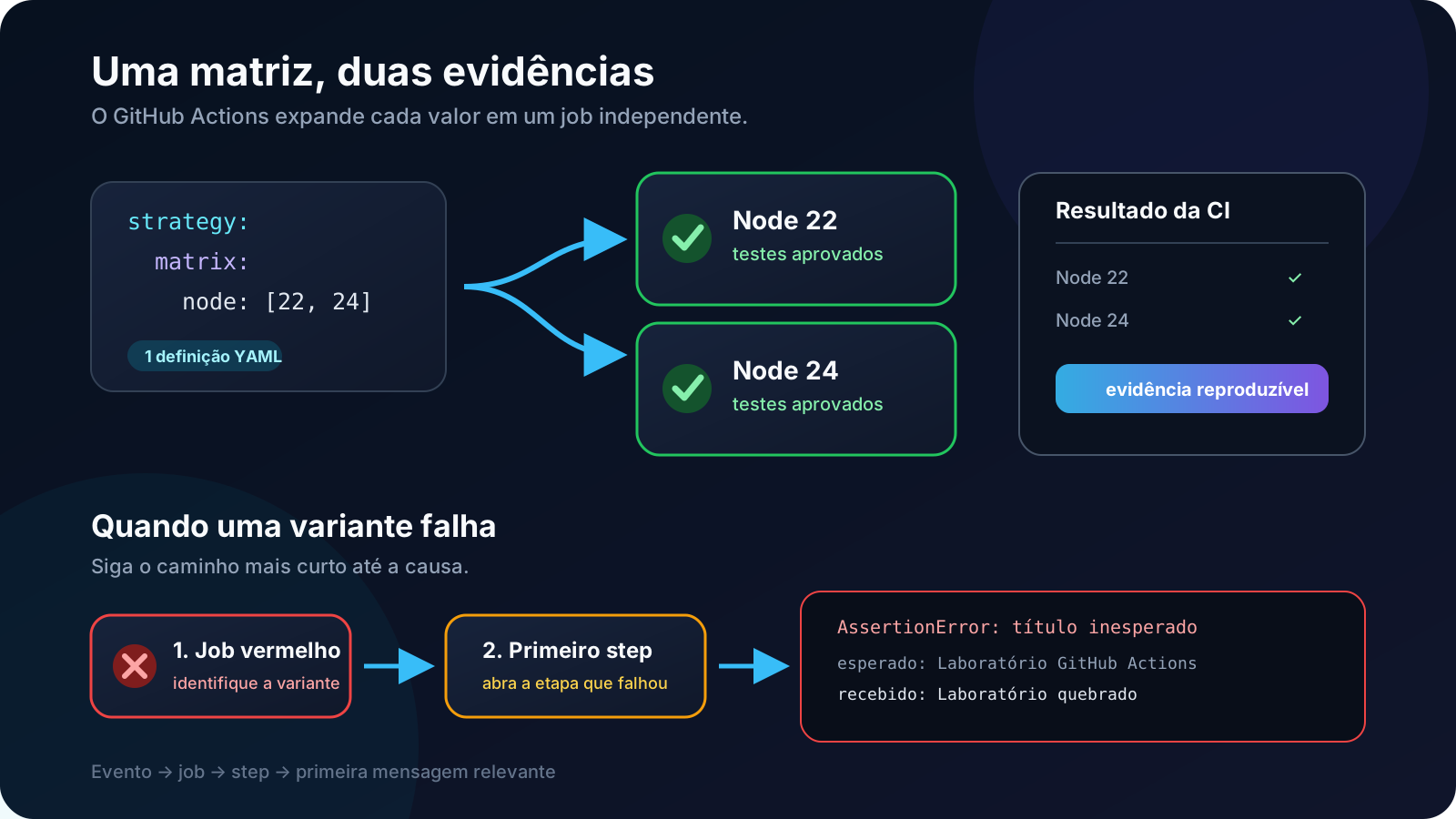
Practice a controlled failure: temporarily change the <title> content without altering the test, commit, and push. Open the red job, then the Executar testes step. The log should show the expected value and the received one. Fix the title, push another commit, and confirm both jobs turn green.
This exercise teaches a core GH-200 skill: starting from the event and configuration, locate the job, find the first step that failed, and interpret the log. The last displayed error is not always the cause. Look for the first relevant break.
When an error is transient, the interface allows you to re-run jobs. When the configuration or code is wrong, fix the repository and trigger a new run. Indefinitely repeating a deterministic failure only wastes minutes.
Bring the evidence to the run summary#
In real projects, you can write test results, coverage, bundle size, and links to the GITHUB_STEP_SUMMARY file. The Markdown content appears in the run summary, saving reviewers from opening every log. Add this step to the end of the test job in .github/workflows/ci.yml, right after Executar testes. Since this job uses a matrix, each Node.js version will produce its own summary and let you observe the matrix and job contexts:
- name: Resumir a execução if: always() run: | echo "## Resultado da CI" >> "$GITHUB_STEP_SUMMARY" echo "- Node: ${{ matrix.node }}" >> "$GITHUB_STEP_SUMMARY" echo "- Status do job: ${{ job.status }}" >> "$GITHUB_STEP_SUMMARY"if: always() makes the step run even when a previous test fails. Do not write secrets or other sensitive data into the summary, as it becomes part of the run record.
Evolve from CI to CI/CD#
Once CI is understood, rename ci.yml to pipeline.yml and replace its content with the full workflow below. It preserves the tests, builds the site a single time after the matrix, and deploys only from main.
name: CI e CD
on:  pull_request:    branches: [main]  push:    branches: [main]  workflow_dispatch:
permissions:  contents: read
jobs:  test:    name: Node ${{ matrix.node }}    runs-on: ubuntu-latest    timeout-minutes: 10    strategy:      fail-fast: false      matrix:        node: [22, 24]
    steps:      - name: Baixar o código        uses: actions/checkout@3d3c42e5aac5ba805825da76410c181273ba90b1 # v7
      - name: Preparar Node.js        uses: actions/setup-node@820762786026740c76f36085b0efc47a31fe5020 # v7        with:          node-version: ${{ matrix.node }}          package-manager-cache: false # sem dependências externas para armazenar em cache
      - name: Instalar dependências        run: npm ci
      - name: Executar testes        run: npm test
  build:    name: Gerar artefato    needs: test    runs-on: ubuntu-latest    timeout-minutes: 10
    steps:      - name: Baixar o código        uses: actions/checkout@3d3c42e5aac5ba805825da76410c181273ba90b1 # v7
      - name: Preparar Node.js        uses: actions/setup-node@820762786026740c76f36085b0efc47a31fe5020 # v7        with:          node-version: 24          package-manager-cache: false # sem dependências externas para armazenar em cache
      - name: Instalar dependências        run: npm ci
      - name: Gerar o site        run: npm run build
      - name: Empacotar para o GitHub Pages        if: github.event_name != 'pull_request' && github.ref == 'refs/heads/main'        uses: actions/upload-pages-artifact@7b1f4a764d45c48632c6b24a0339c27f5614fb0b # v4.0.0        with:          path: dist
  deploy:    name: Implantar em produção    if: github.event_name != 'pull_request' && github.ref == 'refs/heads/main'    needs: build    runs-on: ubuntu-latest    timeout-minutes: 10
    permissions:      pages: write      id-token: write
    environment:      name: github-pages      url: ${{ steps.deployment.outputs.page_url }}
    concurrency:      group: github-pages-production      cancel-in-progress: false
    steps:      - name: Implantar no GitHub Pages        id: deployment        uses: actions/deploy-pages@d6db90164ac5ed86f2b6aed7e0febac5b3c0c03e # v4.0.5
Now there is an explicit dependency:
test (Node 22 e 24) → build → deployneeds: test prevents the build if any test variant fails. needs: build blocks the deployment if the artifact is not produced. Independent jobs can run in parallel. needs creates an order only where it is necessary.
The matrix uses Node.js 22 and 24 to check compatibility, but the build only uses Node.js 24, the approved runtime to produce this lab’s artifact. Testing on multiple versions broadens the evidence. Packaging on a single version makes the production output more deterministic.
workflow_dispatch adds the Run workflow button for manual executions and allows you to choose a reference. The upload step and the deploy job deliberately repeat the same condition: only main can package and deploy to production. A manual trigger from a test branch still runs tests and build, but ignores upload and deploy. In pull requests, the behavior is the same. On a push or manual trigger on main, the build uploads dist as a special artifact named github-pages, and the next job deploys it.
Note
Artifact and cache solve different problems. An artifact is an output of that run, in this case, the site to be deployed. Cache speeds up future runs by reusing data that can be recreated, like package manager downloads. Do not use cache as a promotion channel to production.
Enable GitHub Pages and validate the deploy#
In the repository, navigate to Settings → Pages. Under Build and deployment, select GitHub Actions as the source. The interface might create or suggest the github-pages environment.
Commit the evolution and push the branch:
git add .github/workflowsgit diff --stagedgit commit -m "ci: adiciona deploy do site no GitHub Pages"git pushIn the pull request, confirm that test and build pass and that deploy is ignored. After the merge into main, watch the new run. The deploy job should output the environment URL.
Validate three pieces of evidence:
- the page opens at the published URL;
- the
<h1>matches the versioned content; - the environments tab records the deployed commit.
A green check proves that the commands finished successfully. It does not prove by itself that the user received the expected experience. In real systems, add smoke tests, monitoring, and health criteria after the deployment.
Understand the security decisions#
A pipeline has access to the code, to tokens, and sometimes to production. Treat YAML as privileged code.
Grant the bare minimum#
At the workflow level, contents: read is enough to download the repository. The deploy job redefines permissions to pages: write and id-token: write. When you declare specific permissions, the unlisted ones are denied access.
The GITHUB_TOKEN is created for the run and has its scope limited by the configured permissions. It is not equivalent to a long-lived personal access token (PAT). If an integration requires another credential, ask first if the GITHUB_TOKEN, a GitHub App, or OIDC (OpenID Connect) federation solves the case with less exposure.
id-token: write allows requesting an OIDC token. It does not grant permission to alter any cloud by itself. The provider validates claims like repository, reference, and environment before exchanging this token for temporary access. This avoids storing a long-lived cloud credential in GitHub.
Protect the environment#
The job declares environment: github-pages. Environments can restrict branches, hold their own secrets, and, depending on the plan, require reviewers or a wait timer before the job.
To turn the example into continuous delivery with approval:
- go to Settings → Environments → github-pages;
- restrict deployment to the protected
mainbranch; - configure a reviewer who is not the same person who started the deployment, when the feature is available;
- test the flow with a harmless change.
Environment secrets only become available to the job after the protection rules are satisfied. Do not print secrets, do not write them into artifacts, and do not assume that log masking fixes a leak that has already occurred.
Differentiate env, vars, and secrets#
The lab does not need external configuration, but the GH-200 requires recognizing where each value lives:
envdefines environment variables within the YAML itself. When a name repeats, the more specific scope wins: step, then job, then workflow;varsstores non-sensitive configuration at the organization, repository, or environment levels and is accessed by the${{ vars.NAME }}context;secretsstores sensitive values and should only be passed explicitly to the step or action that needs it, via${{ secrets.NAME }}.
For secrets with the same name, the smallest administrative scope prevails: environment, then repository, then organization. The job only receives the secret from the environment it declares in environment, and only after satisfying its protection rules. Configuration variables follow the same general idea of precedence, but environment variables only become available after the runner starts. Do not rely on them to choose the environment itself or make a decision prior to the job.
Avoid untrusted data in scripts#
Values coming from an issue title, pull request body, branch name, or webhook payload can contain text controlled by someone else. Inserting an expression directly into run can turn data into a command.
When you need to use an input in a script, pass it through an environment variable, apply proper shell quotes, and validate the format. Exercise additional caution with pull_request_target. It can access the privileged context of the base branch and should not run untrusted code from the fork.
Control the supply chain#
- prefer actions maintained by GitHub or trusted vendors;
- read the repository, the license, the releases, and the security policy;
- pin third-party actions to a full SHA;
- use Dependabot to propose reference updates;
- limit which actions and reusable workflows can run in the organization.
Pinning an SHA reduces mutability. It does not turn unknown code into safe code. Trust also requires provenance, review, and maintenance.
Understand the runners#
GitHub-hosted runners are ephemeral for each job. Self-hosted runners offer network and tool control, but they are not an automatic isolation boundary. Untrusted code can reach the machine, local credentials, and network-accessible services.
Do not send pull requests from unknown origins to a self-hosted runner with production access. Separate groups, labels, networks, and permissions according to the trust level.
Concurrency, cost, and performance#
concurrency ensures only one deployment in the github-pages-production group at a time. With cancel-in-progress: false, an ongoing deployment is not interrupted by a newer change. For another system, canceling or queuing depends on how the application handles partial versions and rollbacks.
Before optimizing, measure. Some common decisions:
- reduce the matrix to the supported and relevant combinations;
- use
timeout-minutesto contain stuck jobs; - enable caching only when there are repeated downloads that justify the risk and complexity;
- define a coherent retention policy for logs and artifacts;
- reuse workflows when multiple teams need the same policy;
- avoid repeating production builds by promoting the validated artifact.
In this lab, we disabled the automatic npm cache because there are no external dependencies. Adding cache here would increase the surface area and would not save a meaningful amount of time.
Troubleshooting: read the pipeline as a graph#
When the run fails, follow a predictable order:
- Event: should the workflow have started for this
event_name, branch, or path? - Condition: was the job executed, skipped, or blocked by an environment?
- Dependency: did any job in
needsfail or get skipped? - Matrix: does the failure happen in all variants or just one?
- First red step: what was the command, exit code, and relevant initial message?
- Input and context: did the value come from
github,matrix,inputs,vars, orsecrets? - Permission: does the token only have the access required by the operation?
- Runner: do the image, tool, network, and architecture match what is expected?
Turn on debug logging only for the necessary time and review what will be exposed. Do not “fix” an authorization error by granting write-all. Identify the missing permission and change the smallest possible scope.
Safe rollback#
If the deployment publishes a regression, suspend new changes and identify the last healthy commit. For a commit already shared in main, prefer creating a traceable revert:
git switch maingit pull --ff-only origin maingit switch -c fix/reverte-paginagit revert <HASH_DO_COMMIT_COM_PROBLEMA>git push -u origin fix/reverte-paginaOpen a pull request, run the same checks, and integrate the revert. The pipeline will produce a new artifact with the previous content and keep the history of the decision.
Re-running an old deployment might rely on an artifact that has already expired and does not record a new fix in the code. In applications with databases, queues, or irreversible migrations, rolling back the binary might not be enough. The rollback plan needs to be designed and tested before the first deployment.
GH-200 preparation checklist#
Tip
Use this checklist as active recall: answer without consulting the article and then change the lab to test each hypothesis.
Without checking the YAML, try to answer:
- what is the difference between workflow, job, step, action, and runner?
- when should you use
pull_request,push,workflow_dispatch, andworkflow_call? - how do
needsandifalter the execution graph? - how many jobs will a matrix produce after
includeandexclude? - when should you transport a value via output, artifact, cache, variable, or secret?
- why might a job be skipped even if the workflow started?
- how do organization, repository, and environment scopes affect secrets and variables?
- when should you record information in
GITHUB_STEP_SUMMARY, and what data should never be included in it? - what minimum permissions does the
GITHUB_TOKENneed? - when should you use OIDC instead of a long-lived credential?
- what is the difference between a starter workflow, a reusable workflow, and a composite action?
- how do you limit actions, runners, and reusable workflows in an organization?
- how do you find the first relevant cause in logs from a matrix?
If an answer relies on memorizing a line, modify the lab and observe the behavior. Swap a trigger, remove a needs, force a variant to fail, add approval to the environment, and compare the graph. Practice turns syntax into cause and effect.
References#
Certification
Workflows and deployment
- Understanding GitHub Actions
- Workflow syntax for GitHub Actions
- Workflow commands for GitHub Actions
- Storing workflow data as artifacts
- Deploying with GitHub Actions
upload-pages-artifactofficial repositorydeploy-pagesofficial repository
Security and operations
- Security hardening for GitHub Actions
- Variables in GitHub Actions
- Using secrets in GitHub Actions
- Using environments for deployment
- About security hardening with OpenID Connect
checkoutofficial repositorysetup-nodeofficial repository
Conclusion#
That three-line pull request now does not depend on “it worked on my laptop”. It needs to pass through two runtimes, build a site on a clean runner, produce an identifiable artifact, and respect the environment permissions and rules before reaching the user.
This is the real value of GitHub Actions: not just doing tasks faster, but turning trust into repeatable evidence.
For the GH-200, memorize as little as possible. Build, break, read the logs, restrict a permission, approve an environment, and revert a change. When you can predict what the pipeline will do before clicking Run workflow, YAML stops being a list of keywords and becomes a system you know how to operate.