
Introduction#
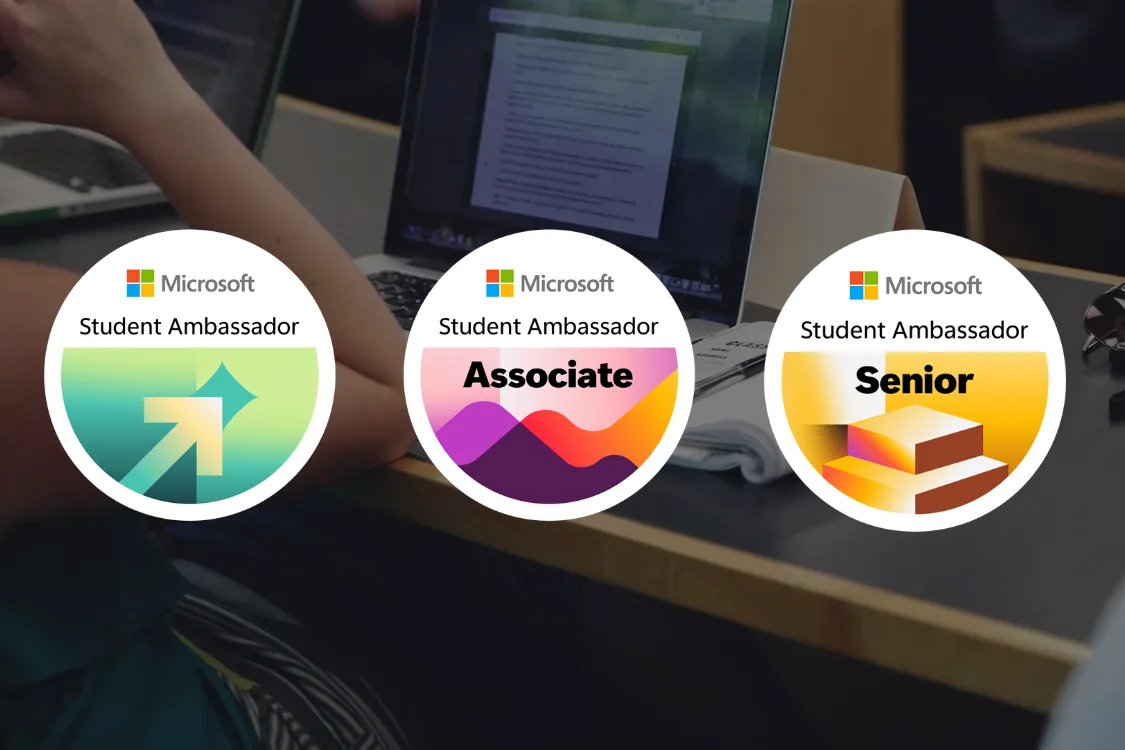
I joined the Microsoft Student Ambassadors program in 2024. Since then, I have organized activities, contributed to the community, progressed through the program milestones, and become a Senior Student Ambassador.
At the time of publication, Brazil has two active Seniors: Jhonatan Lobo and me. That is a snapshot from August 2026, and it can change as more Ambassadors advance.
This experience has placed me on both sides of the conversation. I was once the student trying to figure out where to begin. Today, I help people who arrive with the same questions: Do I need a certification? Is registration an application process? Which path should I choose? When can I actually use the title?
This guide answers those questions using the current process. The journey starts with registration, continues through the Registered Member stage, requires a recent credential and one of two contribution paths, and ends with an invitation and onboarding as a Student Ambassador. After that, I will also explain how to remain active in the program and advance to Associate Student Ambassador and Senior Student Ambassador.
Important
This information was verified on August 21, 2026. Some operational details described in this article come from guidance provided to registered members and may not appear in the public documentation. Targets, benefits, and operational calendars may change. After registering, treat the portal, member handbook, and emails from the program team as the source of truth for your cycle.
What is Microsoft Student Ambassadors?#
Microsoft Student Ambassadors is a global community where students develop technical and leadership skills while helping other people learn Microsoft technologies. That contribution can take the form of online content, Microsoft Learn Plans, projects, campus events, and activities coordinated by the program.
It is not an internship, a job, or a professional certification, and it does not guarantee a role at Microsoft. It is an extracurricular contribution program. You learn something, turn that knowledge into a useful experience for other people, measure the result, and improve the next delivery. It sounds a bit like a DevOps cycle, except with fewer arguments about YAML indentation.
The program is not limited to technology degrees. A Business student can run a session about Microsoft 365 Copilot, a Design student can teach AI-assisted prototyping, and an Engineering student can organize an Azure learning journey. What matters is not the name of your degree. It is your ability to learn, share, and lead responsibly.
The program’s official materials also lean into an innovation angle: building AI-driven solutions, entering competitions like the Imagine Cup, and exploring FounderHub for Startups resources for anyone already thinking about entrepreneurship. That does not replace the contribution path you choose at registration, but it shows the program is also a space for people who want to move past theory and test ideas with Microsoft technology.
You do not need to arrive as an expert either. For students near the beginning of university, the program offers a way to build practical experience while learning with a community.
The Student Ambassadors program can also be a useful starting point for anyone who hopes to become a Microsoft MVP someday. Creating content, organizing events, contributing to communities, and producing measurable technical impact are all relevant experiences in that direction. The programs are independent, though. Being an Ambassador does not guarantee an MVP nomination or award.
Why join the program?#
The most visible benefits include Azure credits, Microsoft 365, Visual Studio Enterprise, certification vouchers, swag, and other opportunities that vary by milestone. The longer-lasting value, however, often comes from the indirect benefits: you practice communication and teaching, learn to organize events and projects, build a portfolio, and turn study into demonstrable experience.
The community also expands your contact with students from other countries, Microsoft MVPs, and Microsoft employees. This can lead to collaborations, mentoring, and learning opportunities that are harder to find by following an individual study path alone. Later in this guide, the benefits section shows what may become available at each program milestone.
How the process works at a glance#
For anyone who wants to see the full journey before getting into the details, the current process can be summarized like this:
Journey map:
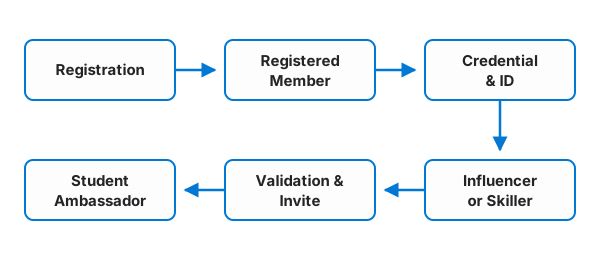
After onboarding, the journey continues with quarterly requirements, approved events, and the possibility of advancing to Associate and Senior.
Requirements to register#
According to the official Student Ambassadors FAQ, you must:
- be at least 18 years old when you register;
- be enrolled full time at an accredited academic institution, such as a college or university;
- have an active Azure for Students account when that requirement is in effect; the public FAQ still lists the account among the requirements, but a temporary pause applies to the current process, as explained below;
- not have been previously removed from the program by Microsoft;
- not be a current Microsoft employee or contractor while participating.
Use a Microsoft account you can keep. Ideally, your Microsoft Learn profile, Azure for Students subscription, and program registration should all use the same identity. Using different identities across these services can cause linking issues and make it harder to track your registration.
Geographic restrictions also apply because of United States export regulations. The FAQ lists Cuba, Iran, North Korea, Sudan, Syria, Russia, Belarus, and the Crimea region as ineligible locations. Students in the United States on an F-1 visa should check with their institution or qualified immigration counsel to confirm that participation is compatible with their status.
Azure for Students#
Azure for Students is normally part of the program’s entry requirements, rather than simply being a benefit on display. The offer is available to higher education students, requires academic verification, and provides USD 100 in credit for 12 months without requiring a credit card, as described in the Azure for Students documentation.
Important
As of August 21, 2026, there is a discrepancy between the public documentation and the operational process. The official program FAQ still lists an active Azure for Students account among the entry requirements. However, according to the current operational guidance for this cycle, that requirement is temporarily paused. You can proceed with registration without that account while the pause remains in effect. Check the FAQ, portal, and guidance you receive from the program before starting a new registration, since this condition may change.
How to register#
Registration begins on the Microsoft Student Ambassadors portal. Microsoft says the form takes less than five minutes. The most important work happens before you open it, when you organize your accounts and confirm that your academic information is correct.
Checklist before the form#
Confirm that you have:
- the Microsoft account you will use for the program;
- a Microsoft Learn profile connected to the same identity;
- an active and verified Azure for Students account, if the requirement is in effect when you register;
- regular access to the email address you provide;
- current information about your institution and degree.
Do not post academic documents, subscription IDs, or personal information in public forums when asking for help. If you have a linking or verification problem, use the official contact listed in the FAQ: sa-help@microsoft.com.
Warning
If the Learn Username field was filled in incorrectly or contains extra information, your certification or Applied Skills credential may not be indexed correctly. If you notice this problem, update your Learn Username by following the guidance displayed in the portal. If editing is not available, contact official support before deleting or creating a new registration.
Registration and the Code of Conduct#
On the portal, select Get Started, complete the form, and accept the terms. Read the Student Ambassadors Code of Conduct as well. It applies to online and in-person activities associated with the program and sets expectations for respectful and responsible participation in the community.
After completing this step, you become a Registered Member. This gives you access to the global Discord community, resources, guidance, and training, but it does not grant the Student Ambassador title yet. The invitation to the Discord channel arrives by email from sa-noreply@microsoft.com. Check your spam folder if it does not appear in your inbox.
Contributor ID#
The next steps arrive at the email address used during registration. One of them is your Student Ambassadors Contributor ID. It is typically sent within three to five business days after registration. This identifier allows eligible activity results to be attributed to your profile. Before opening a support ticket for a delay, check your spam or junk folder. If that window passes and the ID still hasn’t arrived, send an email to registration@studentambassadors.com describing the issue.
It appears in links as a tracking parameter. In the example below, I am using my own Contributor ID, studentamb_365381. Every member receives an individual identifier and must replace this value with the one sent by Microsoft:
?wt.mc_id=studentamb_365381The Student Ambassadors Contributor ID is not a password, token, or the identifier shown in your Microsoft Learn profile settings. That second value is the Learn Contributor ID. The identifier sent by the program remains the same throughout your time as a Registered Member. Keep it and follow the format required by each path, because using the wrong ID may prevent the contribution from being attributed to your profile.
What to complete as a Registered Member#
After registration, the route to onboarding has two parts: earn a recent Microsoft credential and meet the target for one contribution path. You do not need to complete both paths.
There is no fixed published deadline for completing the Registered Member activities. According to the official program FAQ, you can complete them at your own pace. The important point is to meet the requirements in effect when you become eligible for onboarding, especially the credential’s 12-month window and the target for your chosen path.
A recent certification or Applied Skills credential#
The process requires a credential earned during the 12 months before onboarding. It can be a Microsoft Certification or a Microsoft Applied Skills credential. In other words, if your approval and onboarding as a Student Ambassador happen in October 2026, for example, your credential must have been issued between October 2025 and October 2026.
Applied Skills is a scenario-based credential. Instead of assessing a broad job role, it validates a specific skill through a lab. Microsoft compares the formats in the Applied Skills FAQ.
If you are just getting started and want options aligned with the program handbook, two beginner-level Applied Skills credentials are:
- Streamline business workflows with AI chat, which covers using Microsoft 365 Copilot for tasks and business workflows;
- Generate reports with AI research agents, which focuses on producing and refining reports with the Researcher agent.
Both practical assessments are expected to take 45 minutes. Before starting, complete the learning path listed on the credential page and check the Microsoft 365 Copilot access requirements.
You can register before earning the credential, but you must obtain it within the required window to become eligible for an invitation. An older certification is still valuable on your resume, but it does not satisfy this operational requirement.
Choose a credential that fits both your current level and the topic you want to share. The best first step is one you can study, practice, and then explain to someone else.
How to choose a path#
| If you prefer to | More suitable path | Target in August 2026 |
|---|---|---|
| write, record, and distribute content | Community Influencer | 250 Preferred Visitors |
| organize groups and facilitate learning | Community Skiller | 1,000 net-new modules |
Do not choose Skiller only because you enjoy studying alone, since the result depends on other people. Do not dismiss Influencer because your follower count is small either. A focused community can respond better than a huge audience that never asked for the content.
Path 1: Community Influencer Path#
The Community Influencer Path is designed for people who create and share online content. The current target is 250 Preferred Visitors on eligible Microsoft pages shared with your Contributor ID.
How to generate a valid contribution#
Preferred Visitors does not mean 250 raw clicks. It is a Microsoft metric and the exact qualification methodology is not publicly disclosed. Refreshing a page, buying traffic, or dropping links without context does not guarantee a click will be counted as a Preferred Visitor. Use the program report as your reference, not the impression counter on a social platform.
An example helps visualize the difference: sharing a link on LinkedIn with context, explaining why that resource solves a real problem, tends to generate genuine clicks from interested people. Those people may repost it to their own network and grow the reach organically. Dropping the same link into several WhatsApp groups with no connection to what people there actually care about tends to generate silence or irritation, not a valid contribution.
In practice:
- choose an eligible Microsoft page that is useful to your audience;
- remove the language segment from the URL when the path guidance requires it;
- add your Contributor ID correctly;
- explain the problem the resource helps solve;
- share it in channels where there is genuine interest;
- monitor the progress report.
Eligible pages for your Contributor ID#
Not every Microsoft page accepts the Contributor ID. Only traffic to pages contained within the eligible URLs or prefixes listed below counts toward the 250 Preferred Visitors:
View eligible URLs and prefixes for Preferred Visitors
- azure.microsoft.com
- blog.fabric.microsoft.com
- code.visualstudio.com
- community.fabric.microsoft.com
- community.powerplatform.com
- copilot.microsoft.com
- devblogs.microsoft.com
- developer.microsoft.com
- dotnet.microsoft.com
- events.microsoft.com
- imaginecup.microsoft.com
- learn.microsoft.com
- learn.microsoft.com/copilot
- microsoft.com/insidetrack
- microsoft.com/microsoft-365-copilot
- microsoft.com/microsoft-cloud/blog
- microsoft.com/microsoft-copilot/for-individuals
- microsoft.com/microsoft-fabric
- microsoft.com/power-platform
- microsoft.com/startups
- mvp.microsoft.com/studentambassadors/
- powerbi.microsoft.com/blog
- reactor.microsoft.com
- techcommunity.microsoft.com
Sharing a link outside these URLs or prefixes may still generate clicks, but they won’t count toward the path’s official total.
Avoid sharing only the homepage or base address of these URLs and prefixes. Look for a specific piece of content, such as an article, a post, documentation, or an announcement within these pages, that fits what your audience cares about. Generic pages tend to attract less attention than content aimed at a specific interest.
Optional tips and tools for your Contributor ID#
Adding the Contributor ID to each link manually is already enough. If you want to speed up the process, a few Microsoft MVPs have built optional tools:
- Chrome and Edge extension, originally created by MVP Martin Brandl, allowed users to add their Contributor ID to links with a single click. The original project was discontinued and archived, but I am currently working on a refactored version adapted to the current Microsoft Student Ambassador workflow. You can follow the development in this repository.
Important
These tools are built and maintained by the community, not by Microsoft. When using one, double-check that your ID was added correctly: the generated URL should look the same as one you would produce by adding the identifier yourself.
If the URL already contains a parameter introduced by ?, add the Contributor ID with &. Microsoft Learn Plans do not count toward Preferred Visitors for the Influencer path.
Path 2: Community Skiller Path#
The Community Skiller Path is for people who organize structured learning. The current target is to help participants complete 1,000 net-new modules through Microsoft Learn Plans created and shared by the candidate.
A Microsoft Learn Plan organizes content into milestones, lets you invite participants, and tracks their progress. Net-new means a module must be new to that participant after they join the plan. Modules completed earlier do not count again, and the organizer’s own study does not replace participant completions.
A simplified example helps make the rule stick: if someone already completed a module on cloud computing months ago and later joins a Learn Plan that includes that same module, that earlier completion does not count as net-new. Only what the person completes after joining the plan counts toward the target.
When creating the plan, add the Student Ambassadors Contributor ID at the end of its description and to the invitation link, following the path handbook. Microsoft Learn may add the Learn Contributor ID automatically. If that happens, keep the existing parameter and append the program identifier with &.
Include only Microsoft Learn modules and learning paths in the plan. Other content types, such as courses, may require participants to mark completion manually, which can interfere with progress tracking and counting.
After joining, each participant must select Start and agree to share progress. Modules completed before that step do not count toward the target. If the participant selects Drop, their progress no longer contributes to the total.
One thousand modules becomes easier to understand when you turn the number into a class. Fifty participants completing 20 new modules reach 1,000. One hundred participants completing 10 modules do too. The difficult part is not the multiplication. It is keeping people engaged through the final unit.

Start with a clear outcome, such as publishing a first API on Azure or understanding identity fundamentals. Invite a real group, schedule short sessions, and help with questions. The documentation for creating and managing Microsoft Learn Plans explains how the platform works.
From the target to onboarding#
Meeting the target does not change your title immediately. Microsoft processes the metrics, verifies the requirements, and sends invitations in quarterly rounds expected in January, April, July, and October, usually during the second week of each quarter. If you do not complete the activities in time for a round, your activity and count are carried forward for consideration in a future cohort.
Influencer and Skiller reports are updated weekly on Saturdays in Pacific Time and may take up to 48 hours to reflect recent activity. If Friday’s result did not appear on Saturday, wait for that window before opening a support request.
You can also monitor your count on the Progression Board, an individual view where each Registered Member can see only their own progress. It is updated alongside the weekly reports. Before your first report email arrives, the board may appear empty even if you have already started working on the activities.
Warning
Do not use spam, scripts, automated clicks, or any attempt to manipulate the metrics. These practices violate the program rules and the Microsoft Services Agreement, may invalidate the activity, and can result in a request to provide evidence of your contribution. The purpose of each path is to create real value for the community, not to turn the counter into a boss battle.
The flow after reaching the target looks like this:
- metrics processing;
- requirements validation by the team;
- inclusion in the quarterly invitation round;
- invitation acceptance by the student;
- onboarding completion.
Only after accepting the invitation and completing onboarding do you receive the official Microsoft Student Ambassador title, certificate, @studentambassadors.com email account, benefits, and access to the program community in Microsoft Teams.
This distinction matters. A Registered Member participates in the entry community but should not present themselves as a Student Ambassador yet. The title begins at the end of this flow, not when you click the registration button.
After you become a Student Ambassador#
After onboarding, the logic changes: the Influencer and Skiller paths are no longer the gateway into the program. The focus shifts to keeping your participation active each quarter, organizing eligible activities, and building a consistent record of contribution.
How to remain in the program#
The two paths described earlier help you enter the program. After onboarding, an Ambassador must complete two activities every quarter: reach 50 Preferred Visitors by sharing Microsoft content with the Contributor ID and host one approved event that teaches participants about Microsoft technology.
The quarters run from January through March, April through June, July through September, and October through December. Meeting the requirements renews your membership for another quarter. Ambassadors who do not meet them may be removed from the program.
Ambassadors who also satisfy the reward requirement receive 5,000 Microsoft Rewards points. The code is sent to the program email account by the 15th day of the month after the quarter closes. It is personal, cannot be transferred, and expires after 30 days.
People who completed the previous quarter may also be invited to Insider Calls, which cover career development, leadership, and community topics. Rotations connect Ambassadors with product teams and require two approved events in the rotation’s technology area during the previous quarter. Taking part in a Rotation does not replace the current quarter’s membership requirements.
How to advance to Associate and Senior#
After onboarding, each advancement follows a different process. Associate depends on an approved event. Senior depends on consistent impact and a nomination from the program team.
Until early 2026, the milestones were called Alpha, Beta, and Gold. With the update introduced during the first half of 2026, they became Student Ambassador, Associate Student Ambassador, and Senior Student Ambassador, respectively. From this point forward, I use the current names.
From Student Ambassador to Associate#
To advance, you must:
- create and present an event that teaches participants about Microsoft technology;
- submit the event through the platform and wait for approval;
- be the person who created, presented, and submitted the activity;
- notify the
SA-Coordinator, the program support and coordination contact listed in Teams, after submission.
Events hosted by third parties or Microsoft are not eligible. Learn Plans do not count toward this advancement either. Each event can be submitted only once, and only one Ambassador can use it to advance to Associate.
From Associate to Senior#
The program team reviews nominations in January and July, looking for sustained contribution and demonstrable impact.
The criteria considered include:
- having been a Student Ambassador for at least one year and not graduating within six months;
- keeping program requirements current and participating in the Teams community;
- completing Microsoft Learn content and sharing it with the Contributor ID;
- hosting approved events that teach participants;
- maintaining complete program and LinkedIn profiles that document activities and results.
Meeting the criteria does not make the promotion automatic. Nomination and approval remain at the program team’s discretion.
Being one of two Seniors in Brazil makes me proud, but it also brings responsibility. Recognition matters when it becomes room to guide new members and help the community grow. A title without delivery is just an expensive line on your profile.
Benefits and recognition at each milestone#
The official milestones page separates benefits by stage. Your certificate is updated whenever you advance to a new milestone. Swag, vouchers, and special experiences depend on your level, availability, or an invitation.
The table below provides a consolidated view of what changes at each milestone and which benefits or opportunities may become available along the journey.
| Stage | What you receive or may unlock |
|---|---|
| Student Ambassador | Title, certificate, @studentambassadors.com email, Microsoft 365, Visual Studio Enterprise, USD 150 in monthly Azure credits, AI tools, Microsoft Teams, program badges, and an annual badge on Credly, a digital credential platform. |
| Associate Student Ambassador | Previous benefits, USD 100 in swag credit for redemption in the Snappy store, an opportunity for a certification voucher, a possible program letter for a university club called a Campus Club letter, event support, feedback groups, collaborative testing sessions known as bug bashes, and pre-release testing. |
| Senior Student Ambassador | Previous benefits, USD 200 in swag credit for the Snappy store, consideration for special events, campaign leadership, pilots, mentoring with Microsoft MVPs, and possible consideration for an MVP program nomination after graduation. |
The indirect benefits matter too. Producing content deepens your technical knowledge. Organizing events develops communication, teaching, leadership, and planning. Community participation expands your network with other Ambassadors, MVPs, and Microsoft employees, creating opportunities for collaboration, mentoring, and a stronger portfolio.
Azure credit is not cash and cannot be withdrawn. Charges above the available balance are the Ambassador’s responsibility. Vouchers, letters, swag, and events are not automatic. The swag values listed here were current in August 2026, and Snappy credit must be redeemed within the deadline communicated by the program.
Do not confuse the Student Ambassador’s USD 150 in monthly Azure credit with the USD 100 for 12 months from Azure for Students. They are separate offers used at different stages of the journey.
Snapshots from the journey#
I selected a few images that make this journey more tangible. The photos move in a continuous loop and pause when the pointer is over an image. On mobile, swipe sideways to move forward or back. Select any image to enlarge it. On the former Beta and Gold milestone photos, place the pointer over the image to read the context behind the change.
Conclusion#
The current path requires aligned accounts, a recent credential, and the target from one contribution path. Azure for Students is normally part of the entry requirements, but that requirement is temporarily paused as of this publication. After validation, invitation, and onboarding, you move from Registered Member to Student Ambassador.
The journey continues through approved events, quarterly participation, and consistent contribution. I started in 2024, and I now see the program from the Senior milestone. The title matters, but the best stories come from people who learned something at one of your activities and from the confidence you gained to lead the next one.
Still have a question about registration, or want to share which path you chose? Message me on LinkedIn and tell me where you are in the journey.
References#
- Microsoft Student Ambassadors
- Student Ambassadors FAQ
- Student Ambassadors program milestones
- Microsoft Student Ambassadors Code of Conduct
- Microsoft Learn Student Hub
- What is Azure for Students?
- Credentials for students
- Microsoft Applied Skills
- Microsoft Learn Plans overview
- Create and manage Microsoft Learn Plans
- Cover image edited and composed by Thiago Kusal, based on a photo by Startup Stock Photos on Pexels, provided as CC0 on the original photo page.